
The whole product, on one page.
RelayWork is a work OS for teams whose first draft comes from an agent. A spec carries the requirements, the implementation plan, the code that implements it, the tasks, the approvals and the audit trail — and it never moves past a gate a person didn't open.
The way of work
One rhythm from idea to outcome. If you have used Kiro or Spec Kit, the shape is familiar — requirements, then implementation, then tasks. The difference is that here it is enforced, shared, and attached to the code.
Write the requirements
What and why, in the house template — seven questions from "What’s the problem?" to "Any hard rules?". Write it in the app, or have Claude push it through MCP. Bugs and chores skip all of this; they are just tasks.
A person approves them
Named reviewers, approvals bound to a version, review notes the author has to resolve. Edit an approved document and its approvals are superseded — the spec goes back to review rather than drifting.
Explore the code, open a draft PR
This is how the implementation document gets written: read the code, stub the change, open a draft PR. The files it touches attach themselves to the spec. Draft PRs never advance a gate.
Write the implementation doc, anchored to code
Approach, data model, API, failure modes, test strategy, slices of two days or less, rollout. Then paste GitHub permalinks for the parts that carry the decisions — reviewers read prose and source side by side.
Commit specs to the week
Sprints plan in specs, at whatever stage they are. Pull tasks past an unapproved gate and the sprint says so out loud.
Ship it, then check it worked
PRs move tasks to In Review and ship them on merge. Released is not the last stage — outcome review asks whether the thing you shipped did what the spec claimed it would.
Twelve stages, two of them gates
A spec moves in one direction, and everyone can see where it is. Two stages are gates: a named reviewer has to approve before the spec moves on. Approvals are bound to a version — edit the document underneath one and it is superseded, and the spec goes back to review.
Skipping ahead is possible and audited. Every hop is recorded with who moved it and when, so “who decided this?” has an answer six months later.
- DiscoveryShaping the problem
- RequirementsSpec being written
- Requirements reviewapproval gateWaiting on reviewers
- Explore nextApproved — read the code, open a draft PR
- ExploringDraft PR open, implementation doc taking shape
- Implementation reviewapproval gateWaiting on reviewers
- Ready to buildBoth specs approved — pull tasks in
- BuildingExecuting tasks
- ValidationPR merged, verifying
- ReleasedShipped
- Outcome reviewDid it work?
- DoneClosed out
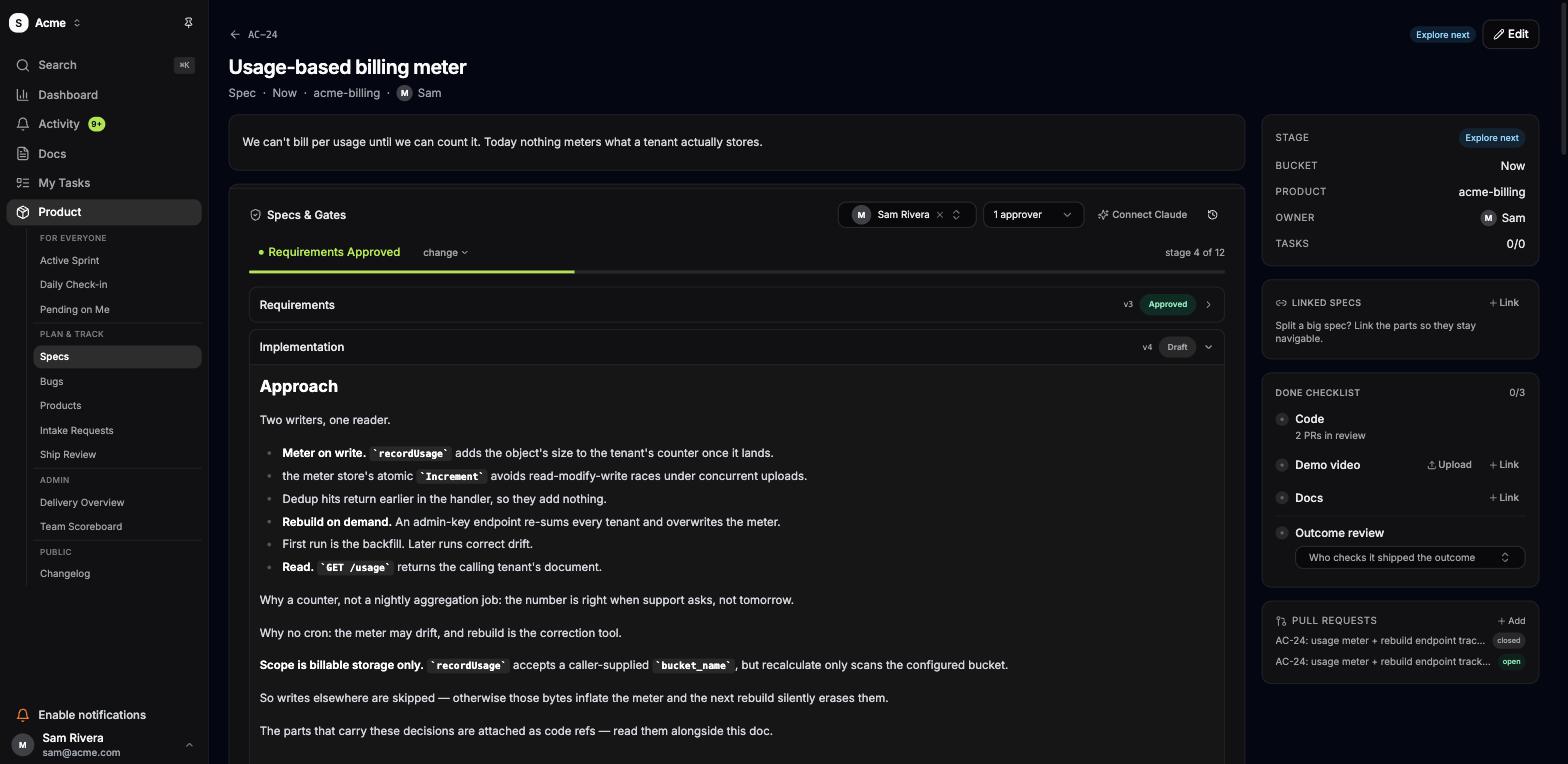
The spec page
Both documents, the stage, the owner, the approvers, the code, the tasks, the pull requests, and a done checklist that will not let you call something finished without a demo and an outcome review.
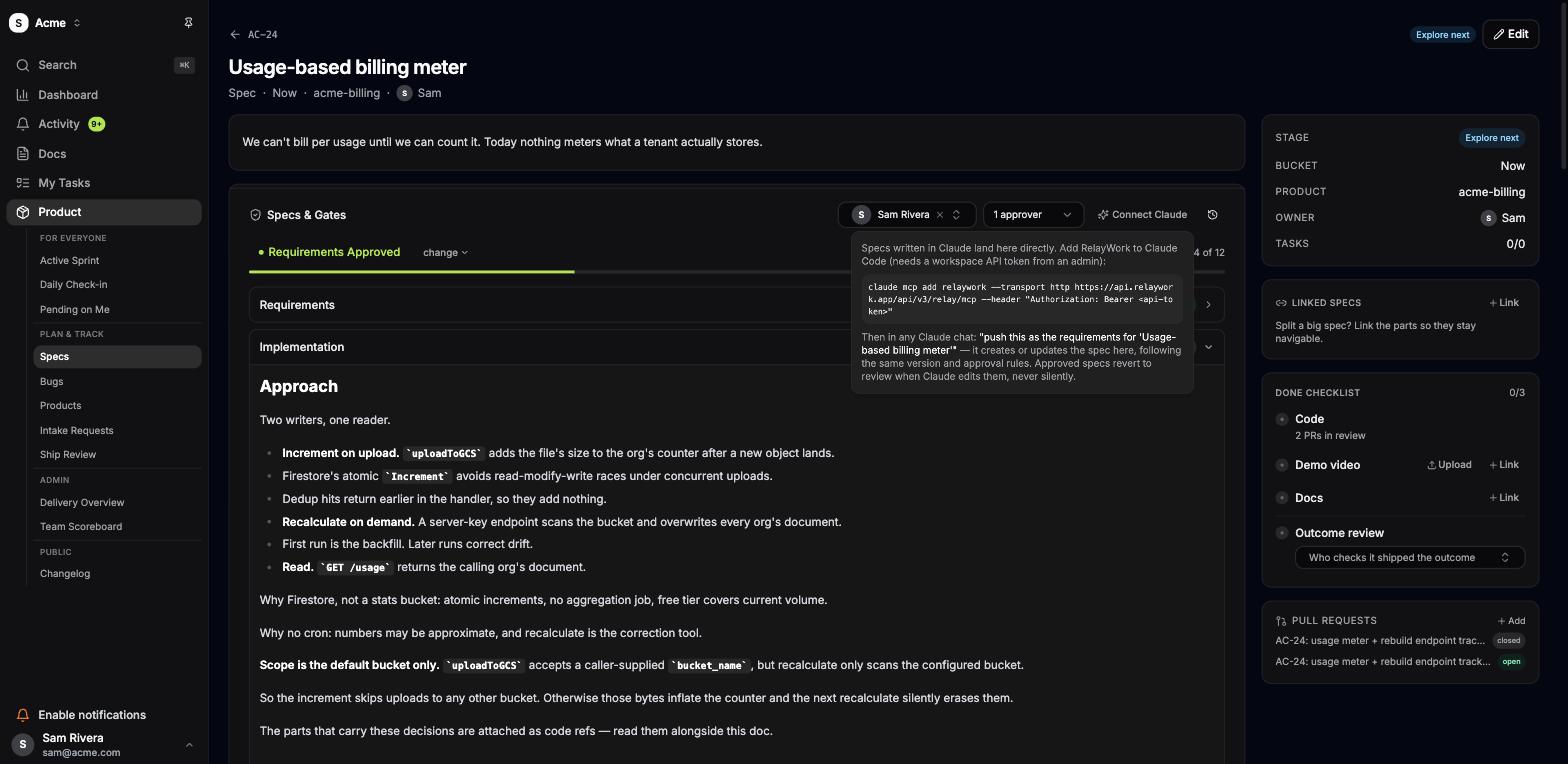
Claude writes into the same gates your team uses
RelayWork speaks MCP. Mint a workspace token, run one command, and Claude Code can read a spec, push a requirements or implementation document in your house template, attach the code it wrote as pinned refs, and ask for review.
What it cannot do is approve. There is no approve tool — not hidden behind a permission, not there at all. Machine writes are attributed to the token, never to a teammate, and a spec Claude edited carries a mark saying so.
- list_specs
- get_spec
- pending_reviews
- list_tasks
- create_spec
- update_spec
- push_spec
- add_code_ref
- request_review
- create_task
- update_task
Lime is write-scoped. Read-only tokens get the rest.
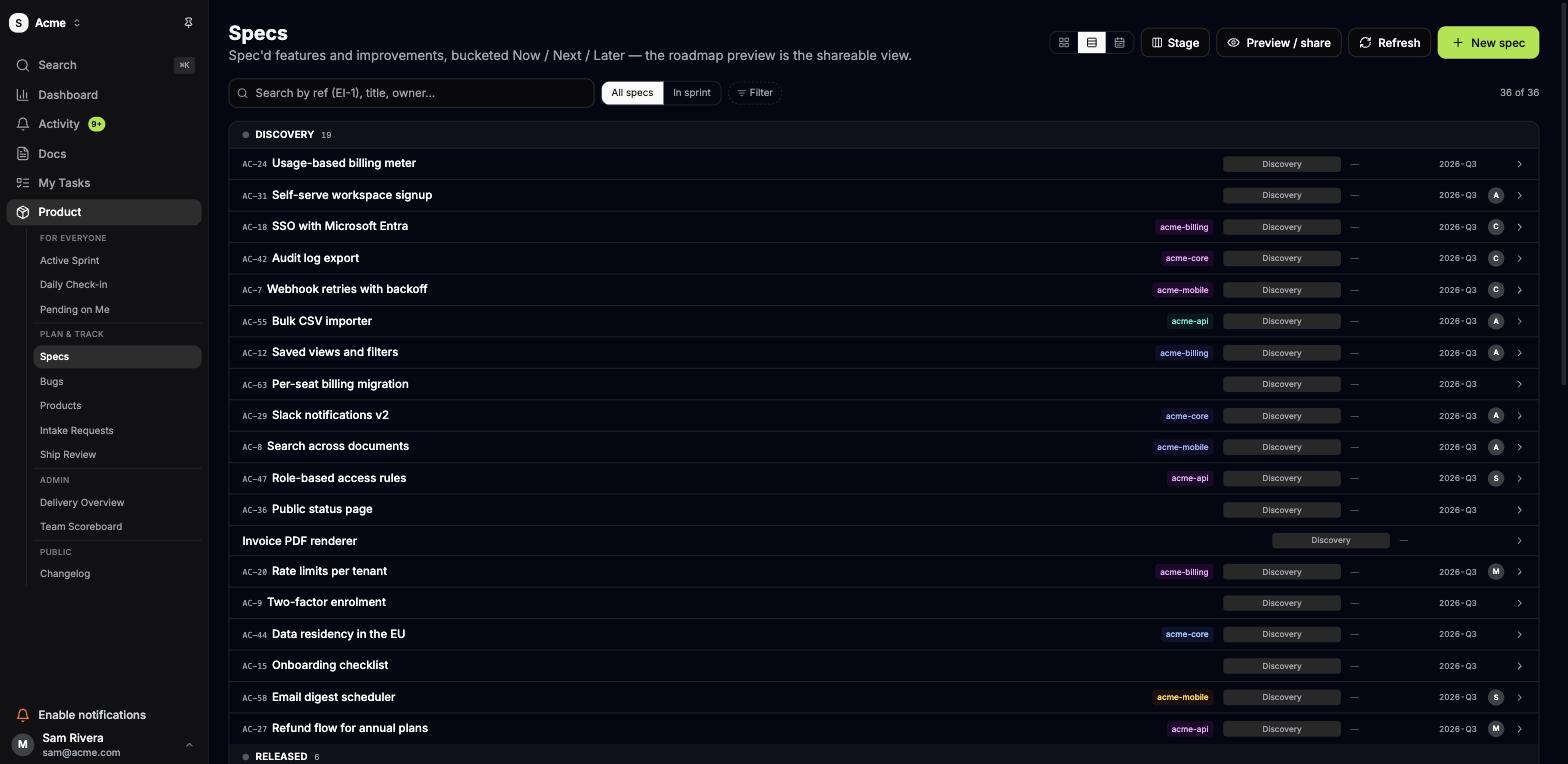
Every spec in the company, grouped by where it stands
List, board, or timeline. Filter by owner, product, quarter or stage; search by reference — AC-24 works in the search box, in a branch name, and in a sentence you type at Claude.
Buckets are Now, Next and Later, and the same board has a shareable customer view — so the roadmap your customers read is the roadmap your team works from, not a slide someone redraws each month.
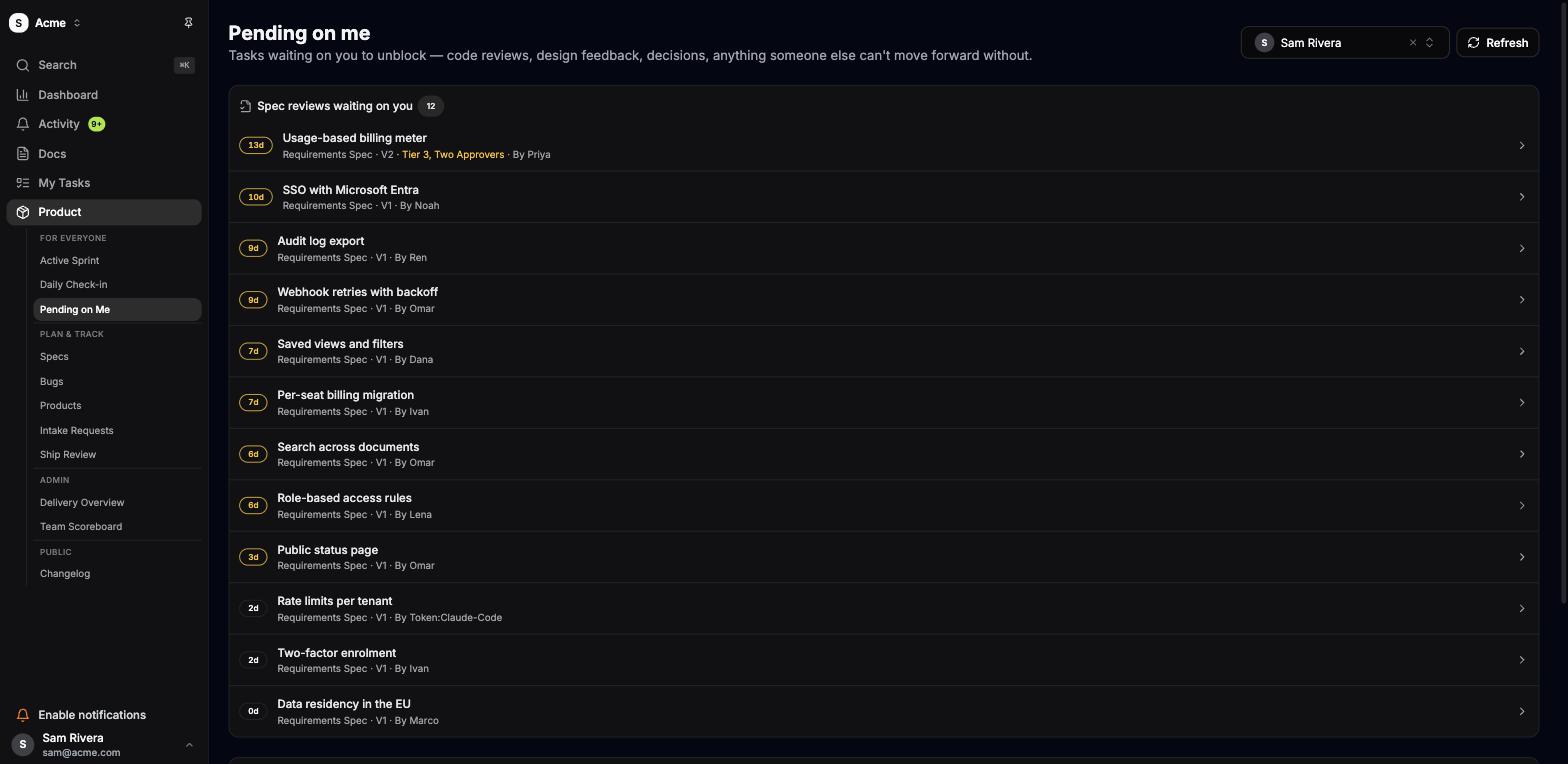
One page for everything waiting on you
Spec reviews with their age in days and which version you were asked about. Blockers someone else can't move without you. Decisions with your name on them.
A review that has sat for thirteen days says so, in the same colour a fire alarm would. Higher-risk specs ask for two approvers before they can move.
Everything in the box
Shipped and running today — this is a list of what the app does, not a roadmap of what it might.
Specs & approvals
Requirements & implementation docs
Two documents per spec, each with its own approval gate and house template.
Version history & diffs
Every edit past review snapshots the old body. Compare any version to the current one.
Review notes
Feedback stamped with the version it was raised against, resolved one by one.
Named approvers & risk tiers
One approver, or two for work that warrants it. Approvals die when the doc changes.
Audit trail
Who moved a spec, from where to where, and when — every hop.
Linked specs
Split a large piece of work and keep the parts navigable from each other.
Code & GitHub
Linked code refs
GitHub permalinks pinned to a commit, rendered as expandable source next to the doc.
Draft-PR exploration
A draft PR attaches the files it touches and never advances a gate.
PR-driven status
Open a PR and the task moves to In Review; merge it and the work ships.
Branch names from refs
Copy the branch name off the spec — the webhook does the rest.
Read-only by design
RelayWork reads your repository. It never writes to your code.
Done checklist
Code, demo, docs and an outcome review before a spec is allowed to be Done.
Plan & track
Sprints that plan in specs
Commit the specs you are advancing this week — writing requirements counts as work.
Typed issues
Features, bugs, chores and a tech-debt bucket, with priorities that mean something.
Tasks under a spec
Slices of two days or less, or standalone work with no ceremony at all.
Products
Group specs by the product they belong to, across one workspace.
Intake requests
Ideas arrive in one queue and get promoted into specs, or declined on the record.
Ship review & delivery overview
What shipped, what slipped, and where the week actually went.
Docs & the workspace
Notion-style docs
A real editor: slash menu, nested pages, private notes, markdown underneath.
Wiki links & backlinks
Reference another doc with [[double brackets]] and see what points back.
Changelog
A public page your customers can read, built from what you actually released.
Google & Microsoft sign-in
Native SSO on your own domain. No third-party identity detour.
Invites, roles & admins
Invite in seconds; the last admin can never lock the team out.
API tokens
Scoped read or write tokens per workspace, revocable, for agents and scripts.
Start with your next spec
Free while in beta. Create a workspace, connect Claude, write the requirements.
Create your workspace